How to Read a Bank Statement: Sections, Codes, and an Example
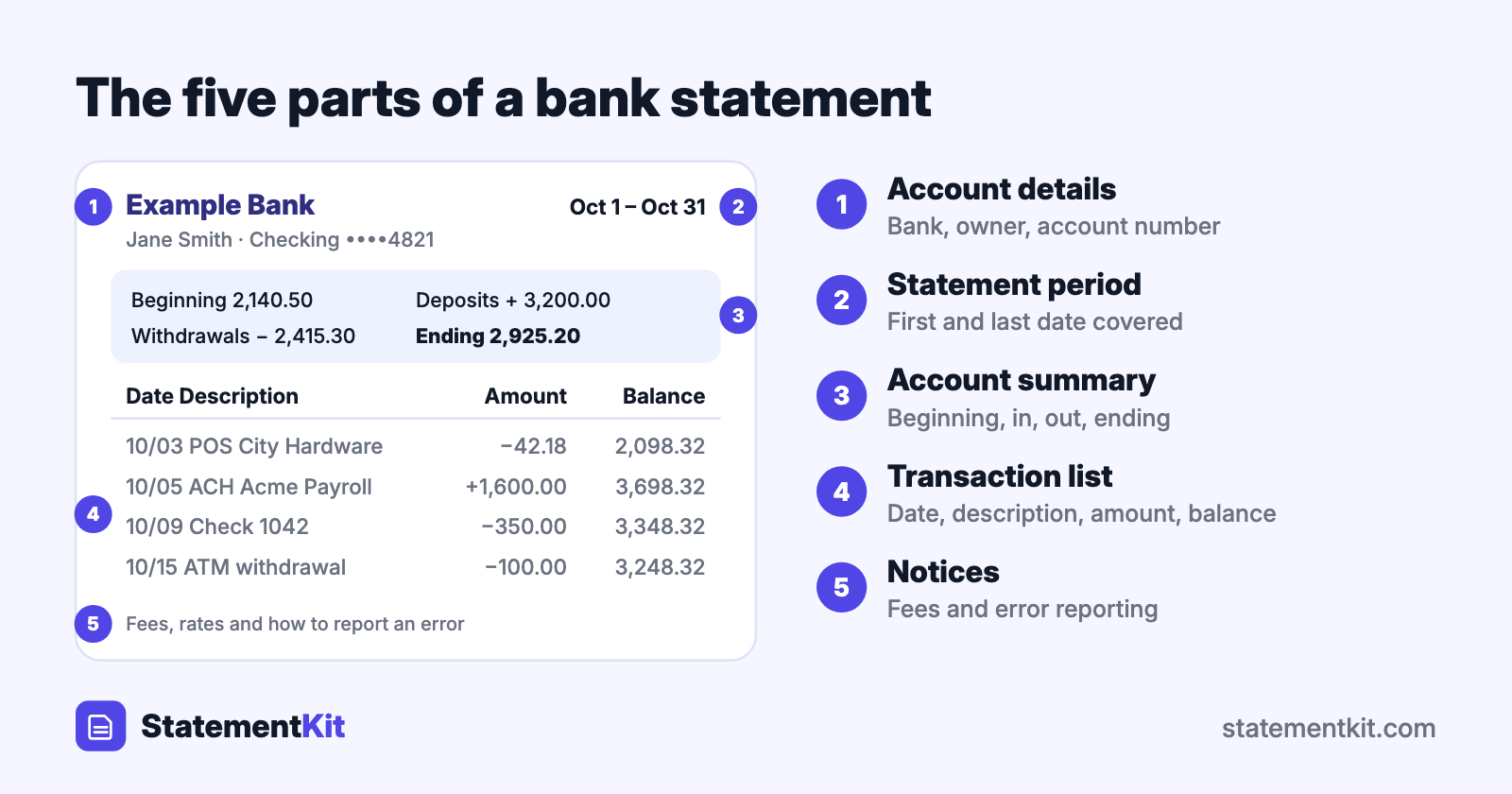
A bank statement is the bank’s official record of one account over one period, usually a month. It shows the balance you started with, every deposit and withdrawal in between, and the balance you ended with. Once you know the five parts every statement shares, any bank’s layout becomes easy to read.
What a bank statement looks like
Statements from different banks vary in design, and they follow the same order from top to bottom:
- Bank and account details. The bank’s name and contact information, your name and address, and the account number, often with only the last four digits shown.
- Statement period. The first and last dates covered, such as October 1 to October 31.
- Account summary. Beginning balance, total deposits and credits, total withdrawals and debits, fees, interest, and ending balance.
- Transaction list. Every transaction in date order with a description and an amount.
- Notices. Fee schedules, interest rates, and instructions for reporting an error.
Reading the account summary
The summary is the whole statement in four lines, and it follows one formula:
Beginning balance + deposits and credits - withdrawals and debits = ending balance
| Line | Amount |
|---|---|
| Beginning balance on Oct 1 | $2,140.50 |
| Deposits and other credits | + $3,200.00 |
| Withdrawals and other debits | - $2,415.30 |
| Ending balance on Oct 31 | $2,925.20 |
If you track your own records, the ending balance is the number you compare against them. That comparison is called a bank reconciliation.
Reading the transaction list
Each row describes one movement of money. A typical layout:
| Date | Description | Withdrawals | Deposits | Balance |
|---|---|---|---|---|
| 10/01 | Beginning balance | 2,140.50 | ||
| 10/03 | POS PURCHASE CITY HARDWARE 0447 | 42.18 | 2,098.32 | |
| 10/05 | ACH CREDIT ACME PAYROLL | 1,600.00 | 3,698.32 | |
| 10/09 | CHECK 1042 | 350.00 | 3,348.32 | |
| 10/15 | ATM WITHDRAWAL MAIN ST | 100.00 | 3,248.32 |
- Date is the posting date, the day the bank processed the transaction. A card purchase made on Saturday often posts on Monday.
- Description combines a transaction type with the merchant or payer. Merchant names are often shortened and may include a store number or city.
- Withdrawals and deposits appear in separate columns at many banks. Others use a single amount column with a minus sign for money out.
- Balance is the running balance after each transaction, or after each day.
Checks often appear in their own section as well, listed by check number so you can spot a missing number in the sequence.
Common bank statement codes and abbreviations
| Code | Meaning |
|---|---|
| ACH | Automated Clearing House: an electronic transfer such as payroll or a bill payment |
| POS | Point of sale: a debit card purchase made in a store or online |
| DD or DIR DEP | Direct deposit |
| EFT | Electronic funds transfer |
| XFER or TFR | Transfer between accounts |
| CHK | Check |
| ATM W/D | Cash withdrawal at an ATM |
| DEP | Deposit |
| INT | Interest paid to you |
| SVC CHG | Service charge, such as a monthly maintenance fee |
| NSF | Non-sufficient funds: a payment was returned because the balance was too low |
| OD | Overdraft |
| PPD | Prearranged payment and deposit: a recurring ACH entry such as a subscription |
| APY | Annual percentage yield: the yearly interest rate including compounding |
| POD | Payable on death |
What POD means on a bank statement
POD stands for payable on death. It appears next to the account owner’s name, as in "Jane Smith POD John Smith", and it means the owner has named a beneficiary who receives the money in the account when the owner dies. The beneficiary has no access to the account during the owner’s lifetime, and the designation leaves the balance and the transactions unchanged. Some banks print ITF ("in trust for") or TOD ("transfer on death") for the same arrangement.
How to check your statement in ten minutes
- Confirm the beginning balance equals last month’s ending balance.
- Scan the deposits and confirm each expected payment arrived in full.
- Read each withdrawal and confirm you recognise the merchant and the amount.
- Look for fees and note what triggered each one.
- Look for repeated charges of the same amount on the same day, and for subscriptions you have stopped using.
- Compare the ending balance with your own records.
If something looks wrong, contact the bank promptly. In the United States, Regulation E gives you 60 days from the date the statement was sent to report an unauthorised electronic transfer and keep the strongest protection.
How long to keep bank statements
A common guideline is to keep statements for at least a year, and for three to seven years when they support a tax return. Digital copies count. Banks keep statements available online for several years, and downloading them as PDFs once a year gives you your own archive.
Working with statement data
Reading a statement on screen works well for a monthly review. For budgeting, tax preparation, or bookkeeping, the transactions are more useful in a spreadsheet, where you can sort by merchant and total by category. StatementKit converts a statement PDF into an Excel or CSV file with the same rows you see on the page.
Frequently Asked Questions
What is the difference between a bank statement and a transaction history?
A statement is a fixed, official document for a closed period, and it is what lenders and landlords ask for. A transaction history is the live list in online banking, which includes pending items and changes as transactions post.
Why is my available balance different from my statement balance?
The statement balance is a snapshot from the last day of the period. The available balance reflects everything since then, including pending card authorisations and deposits on hold.
What does "pending" mean?
A pending transaction has been authorised and is waiting to post. Pending items appear in online banking and enter the statement once they post.
Is a bank statement proof of address or income?
Many organisations accept a recent statement as proof of address, and lenders use several months of statements to verify income. They usually ask for the complete PDF, with every page included.
Want your statement as a spreadsheet?
StatementKit turns a bank statement PDF into a CSV or Excel file with one transaction per row, ready to sort, total, and categorise. The free plan covers 3 statements a month.
Convert Your First Statement Free